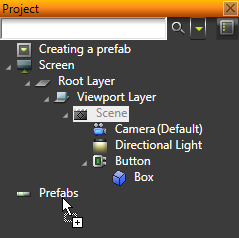
Kanzi Studio creates a prefab template for the hierarchy and replaces the original hierarchy with an instance of the prefab.
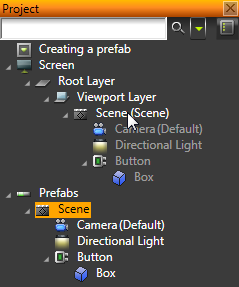
You can make any part of your project hierarchy into a prefab, by dragging the root of the hierarchy to the prefabs folder.
Kanzi Studio creates a prefab template for the hierarchy and replaces the original hierarchy with an instance of the prefab.
You can create prefabs in the Project > Prefabs and then instantiate them in your project. See Using object prefab placeholders and Using layer prefab placeholders
You can also nest prefabs within prefabs.
You can edit the prefabs only in the prefab template itself or in the root object of a prefab instance. The objects inside a prefab instance are gray, if defined under the screen’s hierarchy.
Use the root object of the prefab instance to access the whole prefab instance. If you want to override the content inside the prefab instance, apply the changes to the root object, and forward them to the target property using bindings. If the value is a resource, you can use resource IDs to override the values provided in the prefab template’s dictionary.
See Using object prefab placeholders and Using layer prefab placeholders
Using layer prefab placeholders